godot event editor
Join me as I wax on about implementing dialogue events in the Godot game engine for the 2D top-down pixel RPGs I'm cursed to make.
Godot, being the delightfully non-prescriptive engine that it is, doesn't have a dialogue system built in. There are plugins available that solve this problem, extremely well too (dialogic, dialogue manager). But what if you're really particular about how you do things. Well that's when you implement your own text parsing logic and editor interface. If nothing else, you'll understand your own tooling.
My games tend to have a lot of dialogue and events. Over the years I developed a simple text format for these events that get fed into a management script, parsed line by line, and outputted to a textbox. It includes simple dialogue lines, flag checks for branching paths, and command lines that trigger code. This provides good enough flexibility for my needs, and I find it's quite fast to iterate on.
But there are some limitations to this approach that I go into further detail below. Feel free to skip to the 'Solution' section if you just want to see the plugin.
Click here for a simple explanation of how the system works.
# Example event
? cow_speak == true
+ Cow: Moo.
+ Player: ...
- The cow stares at you with curious eyes.
$ Pat the cow?
+ You pat the cow gently.
+ = cow_pat true
+ > wait 0.5
+ The cow purrs.
- You obstain from patting the cow.
-
# is a comment line. It's skipped/removed in processing but serves the purpose of providing additional context should the event require it. ## Can be used to mark a 'section' which can be jumped to with a '> goto' command.
-
? marks flag checks. Similarly, $ is for dialogue questions. They both set a boolean in an array that gets checked against each line (true for success, false for fail).
-
Only lines marked with the appropriately corresponding '+' and '-' values will run. This allows for nested flag and dialogue choices.
-
Names (marked by a proceeding ':') are extracted from the dialogue line, and given to a name label. It's then a simple task of matching it to a corresponding portrait sprite if desired.
-
'>' denotes a command line. This, and any included arguments are sent to a command handling script to be executed. Examples include simple waits for pacing, triggering animations, changing scenes or even instancing scenes.
That's basically it. Devil's in the details of course, and there's plenty of little tricks I've added over the years to make it more flexible.
Implementation is as simple as having a exported string on a node like so:
@export_multiline var event : String
And checking for that string (or a helper interact() function) when the player selects the appropriate input.
Limitations
This works, I've built sizable games out of it with hundreds of events like this. But it does come with some frictions that only become apparent when you've done it for hundreds of hours.
-
It can be a bit hard to read. Being plain text, it does get tough to parse. Especially for large events that you're coming back to after not looking at for weeks.
-
There's a sizable number of clicks needed to start editing events.
Especially when they're deep in the node tree. Getting ahold of the right node, selecting its exported text field, expanding it so it's actually usable... it gets a lot. -
There's no error checking or syntax highlighting.
Nothing to check that a flag is named correctly or to distinguish one type of line from another.
Solution
With a new project in the works I wanted to streamline this process and improve its usability. Which is why I decided to make my own editor plugin.
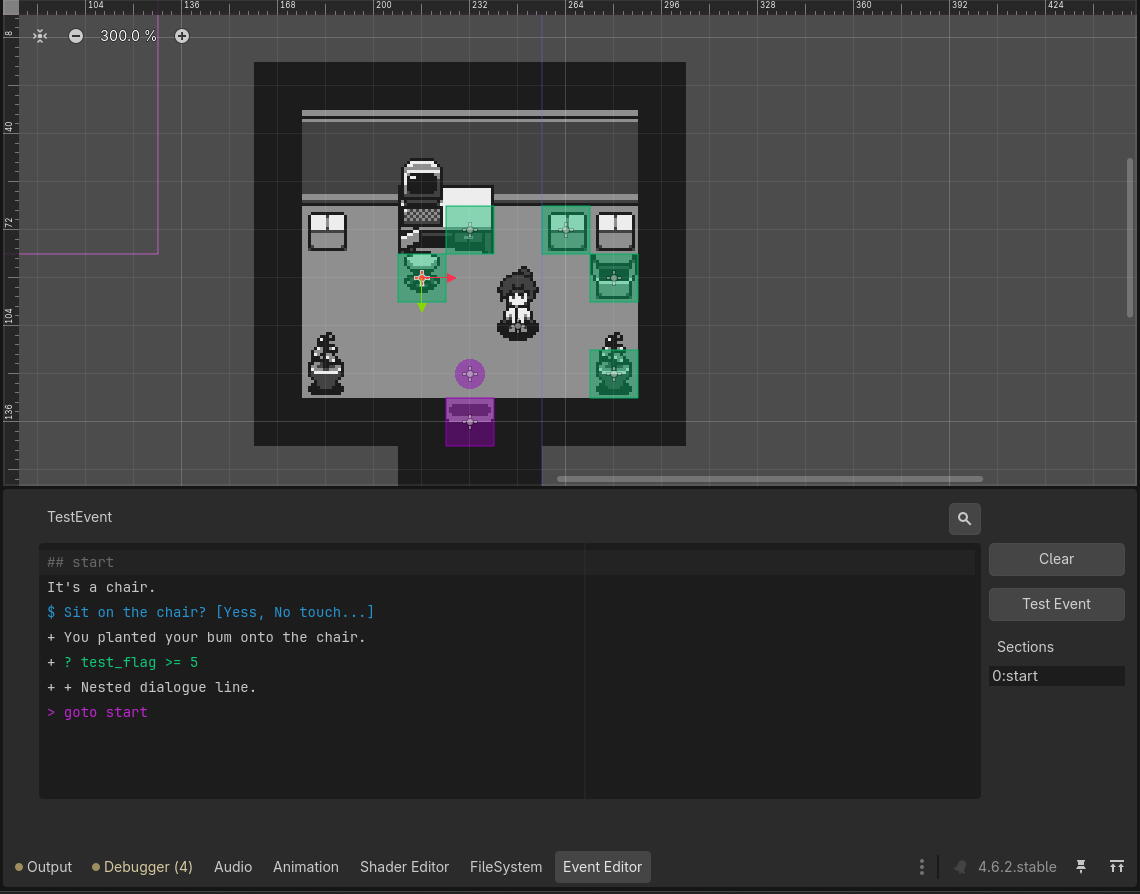
The first version of this looked a lot like an RPG-maker event interface, with pre-formatted lines being inserted. This had the advantage of enforcing formatting for each line type (dialogue, comment, flag check/set, etc). And it worked pretty well, it certainly taught me a lot about popup windows in Godot.
But there is just something about plain text that I missed. Having to use the mouse to press buttons to insert lines, click on list after list to select the right entry. It was introducing new friction, which is what I wanted to avoid in the first place. So scrapped it, and pieced together what you see here.
A dock that appears whenever you select a valid node, similar to the tilemap or animation nodes that. It features a code edit node with custom configuration and highlighting that immediately updates the selected node's event variable when changed.
It has search and replace, clickable sections for longer events, and a test button that runs the game and automatically triggers the edited event. That last one is huge, I can't tell you how much time I've spend speedrun testing for events buried under gameplay.
With some configuration it can even autocomplete, I can enter in the flags and commands to a list and it'll popup with them while typing the appropriate line.
I'm hoping this will speed content making up, since that's the biggest time sink in projects like this once the systems are in-place. Maybe afterwards I'll look at it with disgust and move onto an actual dialogue manager plugin. Probably not though.
End
If working with a team this probably isn't the way to go. Using one of the many competent plugins available is a perfectly valid approach. But if you're particular like me, feel free to reach out if you want any pointers on how to do something like this. I'm not sure about if I'll share it as a plugin, or when. There's a lot of assumptions built into it about my workflow. There's some configuration available about line types and how they're formatted, and there's certainly more that could be done to generalise it. But if there's demand I'll probably open source it or something so others can pick over its bones.